

Small planning teams can manage thousands of SKUS when planners no longer have to review every item manually. The key is to automate routine calculations and ordering, then use exception-based planning to direct people towards the items, suppliers and decisions that actually require attention.
That changes the role of the planner. Instead of building orders line by line, checking spreadsheets and repeatedly reviewing products that are performing as expected, they can concentrate on exceptions.
For businesses with growing product ranges, that shift can make the difference between adding people every time the catalogue grows and building a planning operation that can scale.
How many SKUs can one inventory planner really manage?
There is no universal SKU-to-planner ratio. The number of SKUs one planner can manage depends on demand volatility, supplier complexity, lead times, product lifecycles and, crucially, how much of the planning process is automated.
A planner working primarily in spreadsheets may struggle with a portfolio that a planner using automated, exception-based processes can manage comfortably. The important measure is therefore not simply the number of SKUs. It is the amount of manual work each SKU creates.
A portfolio containing thousands of stable, predictable items may require less attention than a much smaller portfolio of seasonal, promotional or highly volatile products. Supplier lead times, order constraints and the quality of underlying data also affect the workload.
A planner working primarily in spreadsheets has to spend considerable time collecting information, checking stock, reviewing demand and deciding what needs to be ordered. As the product range grows, that workload grows with it. Eventually, reviewing every SKU becomes impractical.
As a market reference point, Nordic beauty and lifestyle distributor Sæther manages a broad portfolio of more than 16,000 SKUs across more than eight brands per planning unit. This figure illustrates the scale modern planning teams can face rather than an efficiency result created by AGR.
Before changing its planning approach, Sæther relied heavily on spreadsheets and manual processes, which made planning time-consuming and difficult to scale.
The important change is therefore not finding a magic SKU-to-planner ratio. It is changing what the planner needs to do for each SKU.
Instead of:
Review everything → decide what needs attention → calculate an order → create the order
the process becomes:
System calculates requirements → routine decisions are automated → planner reviews exceptions → planner intervenes where judgement adds value
This is the principle behind exception-based inventory planning.
Items behaving according to plan do not need the same attention as a product experiencing an unexpected demand spike, supplier delay or potential stockout. Giving planners a way to distinguish between the two allows a much larger portfolio to be managed without every additional SKU creating another manual task.
Scaling to 10,000+ SKUs without increasing headcount
Vital Pet Group manages approximately 10,000 SKUs with an inventory team of just three people: a director of category, a buyer and a category assistant.
One buyer had responsibility for the entire product range, so manually giving every item equal attention simply was not practical.
The answer was not to expand the team. Vital Pet introduced AGR to automate more of its inventory management and ordering, particularly across the long tail of products. The system generates forecasts and supports scheduled supplier ordering, while the team can intervene where an exception requires human judgement.
The same three-person team now manages the 10,000-SKU portfolio without increasing headcount. Product availability has also risen from around 75% to approximately 95%.
The team can spend more time on high-performing SKUs and important supplier relationships instead of treating every product as if it requires the same amount of attention.
The same operating model can work at a smaller scale. Templespa, for example, has two primary AGR users managing up to 2,500 items.
These businesses operate at different scales, but the principle is the same: automated calculations and order proposals reduce the routine work associated with each SKU, while planners focus their attention on exceptions.
Automation is not valuable simply because it makes an existing manual task faster. Its bigger advantage is that it removes routine decisions from the planner’s workload altogether.
A business does not need 10,000 products before automation becomes worthwhile. Once the time required to review items, calculate requirements and build purchase orders begins restricting what planners can achieve, there is an opportunity to automate routine work and manage by exception.
Eliminating manual purchase order work
Purchase order creation is one of the clearest opportunities to reduce manual workload.
A manual process often requires planners or buyers to work through rows of a spreadsheet, checking current inventory, historical sales, outstanding orders, forecasts, lead times and supplier requirements before deciding what to buy.
Multiply that process across hundreds or thousands of SKUs and dozens of suppliers, and ordering can consume a large share of the working week.
Automated ordering changes the mechanical part of that workflow. Instead of building orders, planners review and approve system-generated order proposals based on demand, current inventory, inventory policies and supplier constraints.
The planner remains in control. What disappears is much of the repetitive calculation and administration surrounding the decision.
Customer results show several ways this can translate into greater planning capacity.
Hugh Jordan saved 10 hours generating purchase orders by moving away from its previous manual process. Those hours can instead be used to manage more products or focus on planning activities that require human judgement.
At Muuto, one category manager’s weekly ordering work was reduced from around two hours to approximately 15 minutes.
That is more than a faster order run. Repeated every week, a reduction of that size creates significant additional capacity over the course of a year.
Muuto also uses AGR’s purchase plan as a supplier forecast, giving suppliers forward visibility into expected requirements. Information generated through the planning process can therefore support supplier collaboration as well as internal purchasing.
Kjell & Company provides another type of efficiency gain. Its supplier ordering moved from a daily activity to two days a week.
That is different from reducing the time required for each order run. Instead, the team has reduced how frequently routine supplier ordering needs attention.
Together, these examples demonstrate three ways automation can increase planning capacity: reducing the total hours spent creating purchase orders, shortening individual ordering tasks and reducing how frequently routine orders need to be reviewed.
The common factor is removing manual, line-by-line review from the workflow.
The time that comes back can be used to:
- investigate unusual demand changes
- review products at risk of stockout
- examine excess or slow-moving inventory
- work more closely with strategic suppliers
- plan promotions and seasonal demand
- review new products with limited sales history
- improve forecast inputs
- manage a larger portfolio without increasing administrative workload
That is where automation starts to affect planner capacity rather than simply making individual tasks quicker.
How exception-based planning helps small teams scale
Exception-based planning is what makes this model scalable.
Rather than asking, “What should I do with every SKU?”, the planner can focus on a more useful question: “Which SKUs need my attention today?”
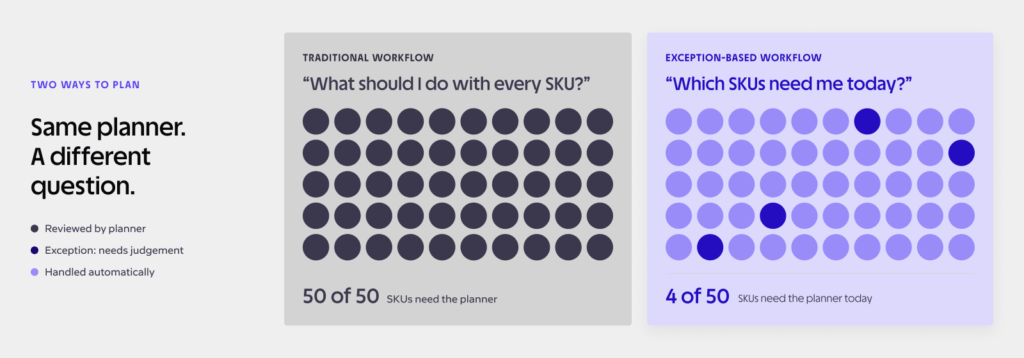
Consider a planner responsible for 5,000 items. If 4,700 are selling broadly in line with expectations and have sufficient inventory or appropriate replenishment already planned, reviewing all 5,000 adds little value. The planner’s expertise is better spent on the remaining 300.
Exceptions might include:
- demand moving significantly above or below forecast
- potential future stockouts
- excess inventory developing
- unusual changes in sales
- supplier lead-time issues
- new items without enough history
- promotional demand
- changes to safety stock requirements
- orders that fall outside normal supplier constraints
Software handles repetitive calculations across the portfolio and brings unusual situations to the surface. People then decide what those exceptions mean and what to do about them.
This approach also reduces the risk that important products or issues get lost in the sheer volume of items a planner manages.
At Vital Pet, AGR manages much of the long tail so the team can devote more attention to the products and suppliers that have the greatest business impact.
At Sæther, moving away from spreadsheet-heavy, reactive planning towards a more structured approach has reduced manual work and helped the team focus on higher-impact activities, including forecasting for new products.
Different businesses have different portfolios, but the principle remains the same: automation handles scale while planners provide judgement.
When should you automate your inventory planning?
There is no particular SKU count at which every company should switch from manual planning to automation. A stronger signal is whether the workload created by your current process is beginning to restrict what the team can achieve.
Planners spend five or more hours a week building or checking PO spreadsheets
If a meaningful part of the working week goes into collecting data, copying figures, calculating order quantities or creating purchase orders, consider how much of that work genuinely requires human judgement.
Routine calculations and repeatable ordering decisions are strong candidates for automation.
SKU growth is outpacing planner headcount
A growing catalogue is good news until every new SKU creates another manual task.
If product lines have expanded substantially over the past 12 months while the planning team has stayed the same size, assess whether the current process can realistically support the next stage of growth.
The alternative does not automatically have to be another hire. It may be possible to reduce the amount of manual work required for each SKU instead.
Stockouts and overstock occur at the same time
A warehouse can contain too much inventory overall and still be short of the products customers actually want.
If planners are constantly firefighting stockouts while other products accumulate, the problem may be prioritisation rather than simply the total amount of inventory.
Automated forecasting and inventory optimisation can help planners distinguish between items that need more stock, those that need less and those that require intervention.
Supplier orders are reviewed daily because they have to be
Frequent ordering is not necessarily a problem. Some suppliers or product groups genuinely require it.
The warning sign is when buyers check suppliers every day because they do not have confidence that the next requirement will otherwise be caught.
Automated order proposals and scheduled ordering can create a more deliberate cadence while still flagging exceptions that require earlier attention. Kjell & Company’s move from daily supplier ordering to two days a week shows what that can look like in practice.
Hiring is the only way you think the team can scale
Headcount may sometimes be the right investment. But if the assumption is that doubling the SKU count must eventually mean doubling the planning team, it is worth examining the process first.
Vital Pet Group’s experience demonstrates an alternative. Its three-person inventory team manages approximately 10,000 SKUs without increasing headcount because much of the routine planning workload no longer has to be handled manually.
Summary of team efficiency outcomes
| Company | Team size / role | SKU / portfolio scope | Time / efficiency outcome | Strategic takeaway |
|---|---|---|---|---|
| Vital Pet Group | Three-person inventory team | Approx. 10,000 SKUs | Large portfolio managed without increasing headcount | Automating routine replenishment allows a lean team to scale while focusing on important products and suppliers |
| Templespa | Two primary AGR users | Up to 2,500 items | Small team manages a substantial product portfolio | The same automation model can support smaller portfolios and teams |
| Hugh Jordan | Purchasing team | Broad product portfolio | 10 hours saved generating purchase orders | Removing manual PO work creates capacity for higher-value activities |
| Muuto | Category managers | Broad design product portfolio | One category manager’s weekly ordering reduced from around two hours to 15 minutes | Automating order calculations releases recurring planning capacity |
| Kjell & Company | Purchasing team | Multi-supplier retail portfolio | Supplier ordering moved from daily to two days a week | Automation can reduce how frequently routine supplier orders need attention |
| Sæther | Supply chain planning team | 16,000+ SKUs across 8+ brands per planning unit | Reduced reliance on manual planning and greater focus on high-impact work | Large portfolios become more manageable when teams move from spreadsheet-heavy planning towards structured, exception-focused processes |
These companies operate different businesses and planning environments, so the figures should not be treated as universal benchmarks.
What they demonstrate is a common operating model: reduce the manual work associated with each SKU so that portfolio growth does not automatically require proportional growth in planning workload.
Modernise your purchasing workflow
Moving from manual purchasing to automated, exception-based planning does not require automating everything at once.
A focused transition can help your team build confidence in the process while measuring the impact.
- Audit your current manual workload. Measure how many hours the team spends each week checking spreadsheets, calculating requirements, creating orders and reviewing suppliers.
- Identify the biggest sources of repetitive work. Look for high-volume suppliers, categories with many routine orders or SKU groups that consume substantial time despite requiring little judgement.
- Start with automated order proposals. Pilot automation with one supplier, category or product group. Let the system calculate suggested orders while planners retain approval and control.
- Define the exceptions that require attention. Decide which demand changes, inventory risks, supplier issues or order values should trigger human review.
- Measure the result. Track the time required to create orders, stock availability and the number of manual interventions.
- Expand gradually. Once the team trusts the process, extend automation to additional suppliers, categories or locations.
AGR’s automated ordering software supports this model by turning forecasts and inventory requirements into suggested orders while allowing planners to adjust them when circumstances require it. AGR is designed to support operations ranging from 500 to 50,000 SKUs.
Ordering is only the downstream part of the process. Reliable automation also depends on understanding future demand. Our guide to demand planning and forecasting explains how forecasting provides the upstream information needed to make better inventory and purchasing decisions.
The goal is not to remove planners from inventory decisions. It is to stop using their time for calculations and routine checks that software can perform continuously.
That leaves the team with more capacity for decisions where experience, commercial knowledge and human judgement matter.
Book a demo to see how AGR can help your team manage a growing SKU portfolio without a growing manual workload.