Microsoft Dynamics 365 supports inventory management through products including Dynamics 365 Supply Chain Management and Dynamics 365 Business Central. Businesses use these systems to track stock, manage inventory transactions and plan replenishment, but the features and workflows differ between the two products. This guide explains how inventory management works in each system, what their planning capabilities include and how additional inventory planning tools can complement them.
What is inventory management in Microsoft Dynamics 365?
Inventory management in Microsoft Dynamics 365 covers the processes businesses use to track, control and replenish stock. It connects inventory records with purchasing, sales, warehousing and, where relevant, manufacturing operations.
Microsoft offers inventory management capabilities through different Dynamics 365 applications. Two of the most relevant are Dynamics 365 Supply Chain Management and Dynamics 365 Business Central. Although both support inventory operations, they serve different business requirements and have distinct approaches to managing stock and planning future supply.
| Capability | Dynamics 365 Supply Chain Management | Dynamics 365 Business Central |
|---|---|---|
| Typical use | Complex supply chains, manufacturing and distribution operations | Small and medium-sized businesses managing finance, sales, purchasing and inventory |
| Inventory tracking | Stock visibility across sites, warehouses and inventory dimensions | Item availability, inventory transactions and stock across locations |
| Warehouse operations | Advanced warehouse management capabilities, depending on configuration | Receiving, shipping, transfers and warehouse processes, depending on configuration |
| Replenishment | Master planning, coverage settings and planned orders | Reordering policies, planning worksheets and requisition worksheets |
| Manufacturing | Production planning and manufacturing operations | Production orders and manufacturing planning with the relevant functionality |
| Additional planning | Can connect with specialised planning solutions | Can connect with specialised forecasting and inventory optimisation solutions |
The distinction matters because the term “Dynamics 365 inventory management” does not refer to one standard set of features. The capabilities available to a business depend on the Dynamics product it uses, its licences and how the system is configured.
Both systems support the fundamental principles of inventory management: maintaining accurate stock records, understanding availability and coordinating supply with demand. The differences become more apparent when businesses need to manage complex warehouse operations, coordinate purchasing across locations or plan inventory against changing demand.
What inventory management features does Dynamics 365 Supply Chain Management offer?
Dynamics 365 Supply Chain Management provides inventory management capabilities designed to connect stock control with wider supply chain operations. Businesses can manage inventory across sites and warehouses, track transactions and coordinate purchasing, production and distribution. Its inventory capabilities also work alongside other functions within Supply Chain Management, including warehouse management, procurement and master planning.
Track stock across sites and warehouses
Dynamics 365 Supply Chain Management allows businesses to monitor inventory across multiple sites and warehouses. Users can examine on-hand quantities and distinguish between different types of stock using inventory dimensions. These dimensions help businesses identify where inventory is located and, depending on configuration, distinguish stock by characteristics such as batch number, serial number, location or inventory status.
For example, a distributor operating three warehouses might have 2,000 units of a product in total. However, only 400 units may be available at the warehouse responsible for fulfilling a particular customer order. The on-hand inventory view helps the team understand the quantities recorded at each location and investigate availability before making purchasing or fulfilment decisions.
This distinction between total inventory and available inventory is important. A business may have sufficient stock overall while still experiencing shortages at individual locations. Multi-site visibility also supports inventory transfers and helps businesses determine whether existing stock can meet demand before placing additional orders with suppliers.
Manage inbound, inventory and outbound operations
Inventory management involves much more than checking how many units are in stock. Businesses need to record the movement of goods as products enter, move through and leave their operations. Dynamics 365 Supply Chain Management supports these activities through connected inventory processes.
Inbound operations begin when goods arrive from suppliers or production. Teams record receipts and update inventory information so that the system reflects the stock received. Internal inventory activities include movements, transfers, adjustments and other transactions that affect where stock is held and how it is recorded.
Outbound operations connect inventory with customer demand. As sales orders are processed, the system supports the inventory transactions associated with picking, shipping and fulfilling those orders. Businesses using the advanced warehouse management capabilities within Supply Chain Management can manage more detailed warehouse execution processes, including location-directed activities and warehouse work.
The distinction between inventory management and warehouse management is useful. Inventory management focuses on stock quantities, availability and transactions, while warehouse management coordinates the physical handling and movement of goods within warehouse operations. Together, these processes help businesses maintain reliable stock information as inventory moves through the supply chain.
Maintain inventory control and quality
Accurate inventory records are essential for reliable purchasing and replenishment decisions. Even sophisticated planning processes can produce poor results when the underlying stock information is incorrect.
Dynamics 365 Supply Chain Management includes inventory counting and adjustment processes that help businesses reconcile recorded quantities with physical stock. For example, a warehouse team may discover that the quantity of a product on the shelf differs from the quantity recorded in the system. Inventory counting processes allow the discrepancy to be investigated and the records adjusted where appropriate.
Inventory status can also help distinguish stock that is available for particular operations from stock that is blocked or subject to restrictions. Quality management capabilities provide additional controls for businesses that need to inspect products or manage quality-related processes. These capabilities are particularly relevant in industries where product specifications, traceability or quality requirements affect inventory availability. The features used will depend on the organisation’s operational requirements and system configuration.
View inventory across connected sources
Businesses increasingly manage inventory across multiple systems and sales channels. A retailer, for example, may need to coordinate stock information between its ERP, warehouses, online store and other connected applications.
Microsoft offers an Inventory Visibility add-in for Dynamics 365 Supply Chain Management that supports inventory visibility across connected data sources. The add-in can help businesses access inventory information from different systems and support availability-related processes across channels. This is particularly useful when inventory information needs to be shared beyond the core ERP environment.
Inventory Visibility is a separate add-in, however, and should not be confused with the standard inventory management functionality available in every Dynamics 365 deployment.
How does inventory replenishment and planning work?
Inventory management tells a business what stock it has and how that stock is moving. Inventory planning addresses the next question: what should the business purchase, produce or transfer to meet future demand? The distinction is important because accurate stock records alone do not determine how much inventory a business should hold.
Dynamics 365 Supply Chain Management supports supply planning through master planning capabilities. These use information about inventory, demand, expected supply and planning settings to calculate future requirements.
The planning workflow can be broken down into four main steps:
1 Review current inventory
The process begins with the current inventory position. The system considers stock on hand alongside relevant supply and demand transactions, such as purchase orders, sales orders and production requirements.
2 Apply planning parameters
Planning settings influence how the system responds to projected shortages. These may include coverage rules, lead times, order quantities and other parameters that determine when and how additional supply should be planned.
3 Generate planned orders
The planning process calculates future supply requirements and can generate planned purchase orders, planned production orders or planned transfer orders, depending on the requirement and configuration.
4 Review and execute
Planners evaluate the resulting suggestions and determine how to proceed. Once planned orders are approved and converted into operational orders, the ERP supports their execution.
Consider a wholesaler that expects to sell 500 units of a product over the coming month. It currently has 200 units available and another 100 units due to arrive from a supplier. The business therefore faces a potential shortage of 200 units before considering any additional inventory requirements or planning buffers. Master planning evaluates the relevant demand and supply information against the item’s planning settings and can propose additional supply to address the requirement.
The example is deliberately simplified. Actual planning calculations may also consider demand timing, lead times, existing commitments, safety stock, order multiples and other constraints.
This creates a connection between inventory records and future supply decisions. However, the quality of the resulting plan depends on the underlying data and planning policies. Inaccurate lead times, outdated demand assumptions or inappropriate order settings can affect replenishment recommendations. Effective inventory planning therefore requires regular attention to both the data and the decisions behind the calculations.
How does inventory management work in Dynamics 365 Business Central?
Dynamics 365 Business Central provides inventory management as part of a broader business management system that connects finance, purchasing, sales and operations. It supports many of the same fundamental business processes as Supply Chain Management, although the functionality and workflows differ.
For businesses managing stock across multiple products, suppliers and locations, Business Central provides the operational records and processes needed to manage inventory and coordinate replenishment.
Items, locations and inventory transactions
Inventory management in Business Central begins with item records. An item record contains information about a product, including details used for purchasing, selling, costing and replenishment. Businesses can use locations to manage inventory held in different warehouses, stores or other stockholding facilities.
For example, a wholesaler may operate a central distribution warehouse and a smaller regional warehouse. Business Central can track inventory quantities at each location and support transfers between them. Purchasing transactions record incoming stock, while sales transactions reflect the movement of products to customers. Item ledger entries provide a record of inventory transactions and help businesses understand how quantities change over time.
Business Central also provides item availability information that helps users review stock and expected supply and demand. This information is valuable when deciding whether an order can be fulfilled, whether stock needs to be transferred or whether additional purchasing is required.
Depending on the warehouse configuration, Business Central can also support receiving, picking, shipping and other warehouse activities. These capabilities connect physical inventory operations with the financial and commercial processes managed within the ERP.
Replenishment and planning in Business Central
Business Central includes native replenishment and supply planning functionality. Businesses can define replenishment policies for items and use planning tools to determine when additional stock may be required.
Reordering policies influence how Business Central calculates supply suggestions. Depending on the policy and settings, the system can respond to projected inventory requirements using approaches such as fixed reorder quantities, maximum quantities or order-based replenishment.
The requisition worksheet and planning worksheet support the review and creation of supply suggestions. These tools use information from inventory records, expected demand, existing supply and planning parameters to identify requirements.
For example, a retailer using Business Central may have an item that regularly sells 100 units per week. Its supplier normally takes three weeks to deliver, and the business wants to maintain additional stock to protect availability. The replenishment settings help determine when the retailer needs to order more stock and how much to purchase. As demand changes or new supply is recorded, the business can run planning calculations again to review its requirements.
Business Central therefore provides more than basic stock tracking. It includes tools for replenishment and planning, which businesses can configure to suit their operations. The question for inventory teams is whether those capabilities provide the level of forecasting, optimisation and automation they need as their operations develop.
Businesses can also connect Business Central with specialist solutions. For example, AGR’s Microsoft Dynamics 365 Business Central integration connects ERP data with dedicated inventory forecasting and replenishment planning capabilities.
When might a Dynamics 365 user need additional inventory planning tools?
Microsoft Dynamics 365 provides substantial inventory management and planning functionality. Whether a business benefits from additional tools depends on its operational complexity, planning requirements and the processes it wants to improve.
A business with relatively predictable demand and straightforward purchasing requirements may find that its existing Dynamics functionality meets its needs. Others may want more specialised forecasting, inventory optimisation or automated replenishment capabilities as their product ranges, supplier networks and inventory investments grow.
The starting point is to evaluate how effectively the current planning process supports business objectives.
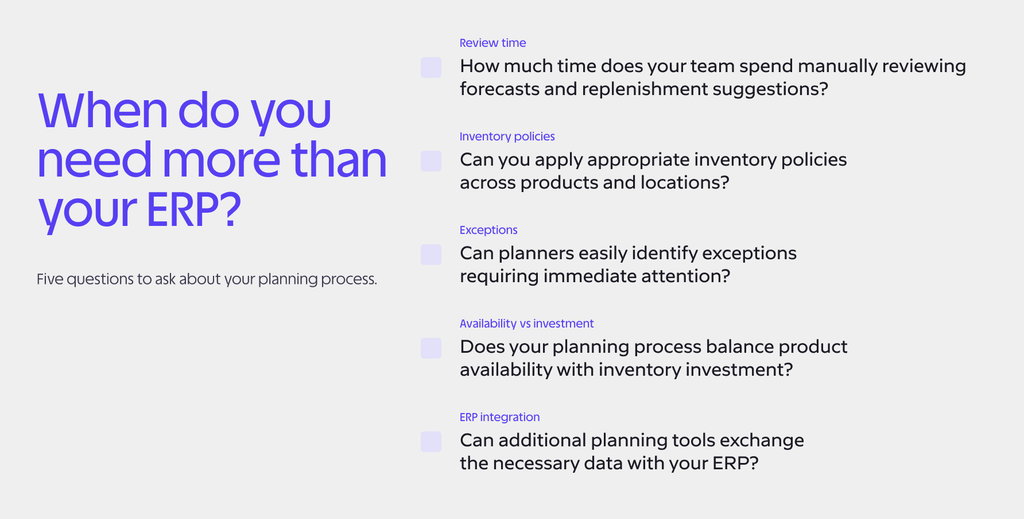
Key questions to consider include:
- How much time does your team spend manually reviewing forecasts and replenishment suggestions?
- Can you apply appropriate inventory policies across products and locations?
- Can planners easily identify exceptions requiring immediate attention?
- Does your planning process balance product availability with inventory investment?
- Can additional planning tools exchange the necessary data with your ERP?
These questions can help businesses identify where their existing processes work well and where additional planning capabilities might deliver value.
Forecasting and replenishment workloads
Inventory teams often manage hundreds or thousands of individual products, each with different demand patterns, supplier lead times and replenishment requirements. Reviewing forecasts and purchasing suggestions manually can become time-consuming as the number of items increases.
Businesses should consider how much time planners spend preparing data, reviewing recommendations and adjusting orders. They should also assess whether their current tools help them identify the items that genuinely need attention.
Dedicated demand forecasting and replenishment software can support this process by analysing demand patterns, generating recommendations and automating routine planning activities.
Inventory policies and service levels
Different products require different inventory policies. A fast-moving item with stable demand may need a different approach from a seasonal product or a slow-moving item with an unreliable supplier.
Businesses need to consider whether their current planning settings allow them to apply appropriate policies across their product ranges and locations. This includes evaluating safety stock requirements, reorder quantities, supplier lead times and desired service levels.
The goal is to maintain product availability without tying up unnecessary working capital in inventory. More specialised inventory optimisation tools can help businesses evaluate these trade-offs and adapt inventory policies to changing conditions.
Exception-based planning
Not every inventory item needs the same level of attention. A product with stable demand and reliable replenishment may require little intervention, while an unexpected demand increase or supplier delay could require an immediate decision.
Exception-based planning helps teams focus on the situations that matter most rather than reviewing every item in the same way. Businesses evaluating additional planning software should consider whether it can identify potential stockouts, excess inventory, unusual demand patterns and other conditions that require action.
This approach becomes particularly valuable for smaller planning teams responsible for large product portfolios.
Data integration and planning accuracy
Any additional planning solution needs reliable information from the ERP. Inventory quantities, sales history, purchase orders, supplier information and other operational data provide the foundation for forecasting and replenishment calculations.
Businesses should assess what information needs to move between systems, how frequently it must be updated and how planning recommendations will return to operational workflows.
The objective is to maintain consistent data while allowing each system to perform the functions it is best suited to support.
How can AGR support inventory planning in Microsoft Dynamics?
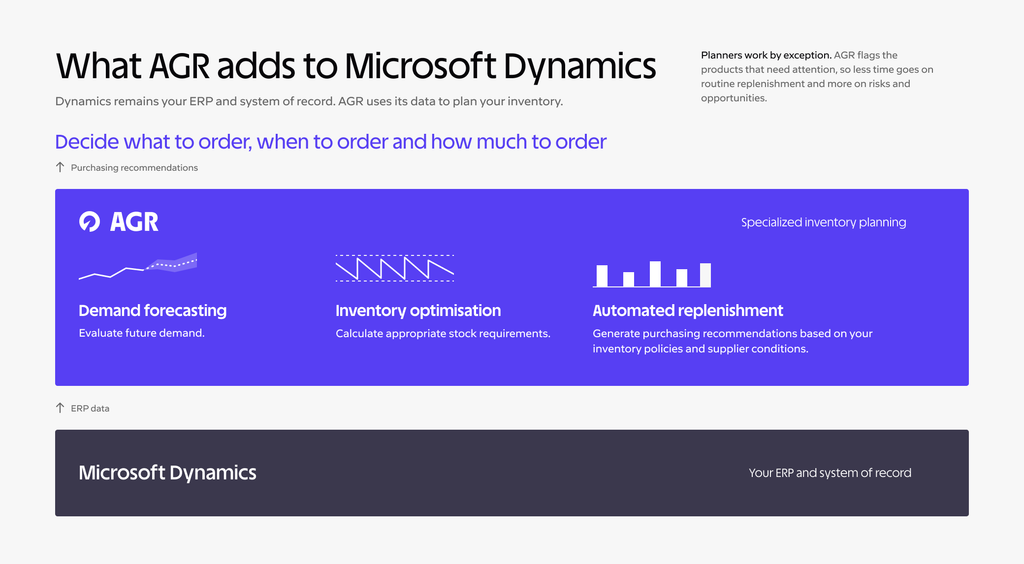
AGR complements Microsoft Dynamics by providing specialised inventory forecasting, optimisation and replenishment capabilities. Dynamics remains the ERP and system of record, while AGR uses ERP data to support planning decisions and help businesses determine what to order, when to order and how much to order.
Our software combines demand forecasting with inventory optimisation and automated replenishment. This allows inventory teams to evaluate future demand, calculate appropriate stock requirements and generate purchasing recommendations based on their inventory policies and supplier conditions.
AGR also helps planners work by exception, identifying products that require attention so they can spend less time reviewing routine replenishment decisions and more time addressing risks and opportunities.
AGR and Dynamics 365 Business Central
AGR has a dedicated integration with Microsoft Dynamics 365 Business Central. It connects inventory, sales and purchasing information from Business Central with AGR’s planning capabilities, allowing businesses to use their existing ERP data for forecasting, inventory optimisation and replenishment.
Business Central continues to manage the underlying business transactions, while AGR supports the decisions that inform purchasing and stock planning.
This allows businesses to continue managing their day-to-day operations in Business Central while using AGR to support demand forecasting, inventory optimisation and replenishment decisions, without replacing their existing ERP.
Learn more about AGR’s integration with Microsoft Dynamics 365 Business Central.
AGR and other Microsoft Dynamics ERP systems
AGR also supports integrations with other Microsoft Dynamics ERP systems, including Dynamics NAV, C5, AX and Finance & Operations.
Businesses using these systems can explore how AGR connects inventory information with forecasting and replenishment workflows. The specific integration approach and available functionality depend on the ERP product and configuration.
Our Microsoft Dynamics integrations page provides more information about the systems we support.
Microsoft Dynamics provides the operational foundation for managing inventory, purchasing and sales. AGR builds on that foundation by helping inventory teams turn their data into more informed planning and replenishment decisions.
Using Microsoft Dynamics for inventory management? Discover how AGR integrates with your ERP to improve demand forecasting, optimise stock levels and streamline replenishment planning.