Inventory replenishment software helps businesses decide what to replenish, when to order and how much stock they need. AGR brings together demand forecasts, current and incoming stock, supplier constraints and location-specific requirements to calculate replenishment proposals. Planners can review and adjust these recommendations before approved orders are sent to their ERP, helping teams maintain product availability while keeping inventory investment under control.
What does inventory replenishment software do?
Inventory replenishment software uses information such as stock on hand, expected demand, incoming purchase orders and supplier lead times to recommend when and how much inventory to replenish. Depending on the system, these recommendations may include purchase orders, stock transfers between locations and approval workflows. The goal is to make replenishment decisions more accurate and efficient, reducing the manual work involved in maintaining the right inventory levels.
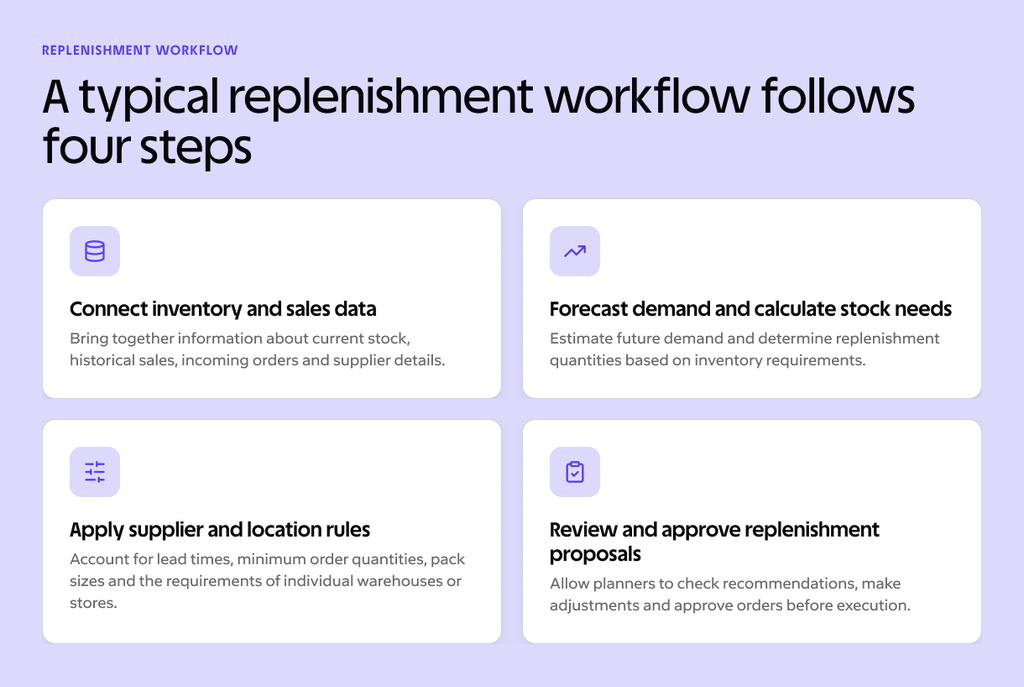
A typical replenishment workflow follows four steps:
- Connect inventory and sales data. Bring together information about current stock, historical sales, incoming orders and supplier details.
- Forecast demand and calculate stock needs. Estimate future demand and determine replenishment quantities based on inventory requirements.
- Apply supplier and location rules. Account for lead times, minimum order quantities, pack sizes and the requirements of individual warehouses or stores.
- Review and approve replenishment proposals. Allow planners to check recommendations, make adjustments and approve orders before execution.
This process connects demand planning with purchasing decisions, helping businesses replenish stock according to future requirements rather than simply replacing what has already been sold.
For a more detailed explanation of the process and different replenishment methods, read our guide to stock replenishment and how it works.
What should you look for in replenishment software?
Choosing inventory replenishment software involves more than finding a system that automatically creates purchase orders. The software needs to support the way your business operates, including how you forecast demand, manage suppliers, distribute inventory and make purchasing decisions.
The most useful systems bring these activities together, allowing planners to understand why replenishment is needed and retain control over the final decision. They should also work with your existing business systems rather than requiring teams to maintain separate sets of inventory data.
The following capabilities are worth evaluating when comparing solutions or attending a software demonstration.
| Capability | Why it matters | What to ask a vendor |
|---|---|---|
| Demand forecasting | Replenishment should reflect expected future demand rather than only today’s stock position. | How does the system forecast demand, including seasonality and changing sales patterns? |
| Stock and order visibility | Accurate proposals need to account for stock on hand, incoming orders and existing commitments. | Does the software consider available stock, outstanding purchase orders and committed quantities? |
| Supplier constraints | Lead times, minimum order quantities, pack sizes and order frequency affect purchasing decisions. | Can supplier-specific purchasing rules be included automatically in order proposals? |
| Multiple locations | Different stores and warehouses may have different demand patterns and replenishment requirements. | Can the system calculate replenishment needs separately for each location? |
| Planner control | Purchasing teams need to understand, review and adjust recommendations before orders are placed. | Which proposals can planners review, change or approve before execution? |
| ERP integration | Replenishment planning should use reliable operational data and fit existing purchasing processes. | What data is exchanged with our ERP, and how are approved orders returned? |
| Exception handling | Teams need to identify unusual orders and potential problems without reviewing every routine recommendation. | How does the software highlight orders or items that need attention? |
These questions can reveal important differences between solutions that appear similar at first glance. For example, two systems may both offer automated ordering, but one may simply replenish stock when it falls below a fixed threshold, while another uses demand forecasts, supplier information and inventory policies to calculate purchasing requirements.
It is also worth asking vendors to demonstrate how their software handles a realistic scenario from your business. A product with changing demand, a supplier with variable lead times or an item that must be ordered in full cases can reveal more about the system’s capabilities than a standard feature demonstration.
How does AGR handle inventory replenishment?
AGR connects demand forecasting, inventory optimisation and automated ordering to help purchasing teams make informed replenishment decisions. Rather than relying on fixed ordering quantities or manually calculating requirements in spreadsheets, planners can work with replenishment proposals based on current inventory information and expected future demand.
The process is designed to support automation while keeping planners in control of the decisions that matter.
Plan orders around forecast demand
AGR uses demand forecasts alongside current inventory positions, incoming stock, supplier lead times and safety stock requirements to calculate replenishment proposals. This allows purchasing decisions to reflect what the business expects to need rather than simply replacing quantities that have already been sold.
Forecast demand is particularly important when products have seasonal sales patterns or long lead times. A business ordering several months ahead needs to consider how demand may change before the goods arrive. AGR helps planners account for these future requirements when calculating order quantities.
Inventory optimisation also plays a role in determining how much stock to hold. Safety stock and service level targets help balance availability against the cost of excess inventory, allowing different products to be managed according to their demand patterns and supply risks.
Forecasts provide a basis for replenishment decisions, but they do not eliminate uncertainty. Planners can review recommendations and adjust orders when they have additional information about upcoming promotions, customer requirements or supplier circumstances.
Account for supplier and location rules
Replenishment decisions must also reflect the practical constraints of purchasing and distribution. Suppliers may require minimum order quantities, full case packs or orders placed on particular days. Delivery lead times can vary between suppliers, and different warehouses or stores may have their own stock requirements.
AGR incorporates relevant supplier and inventory settings into replenishment calculations, helping teams generate proposals that reflect how they actually purchase goods. This reduces the need to manually adjust orders to meet supplier requirements after quantities have been calculated.
For businesses operating across multiple locations, replenishment planning also needs to account for differences in demand and stock availability. A product that sells quickly in one store may move much more slowly in another, so applying identical replenishment quantities across all locations can lead to shortages in some places and excess stock in others.
AGR supports location-specific planning, helping businesses make replenishment decisions according to the requirements of individual stock locations.
Review exceptions and send approved orders to your ERP
Automated replenishment is most useful when it reduces routine work without removing the planner’s ability to intervene. AGR calculates order proposals that purchasing teams can review, adjust and approve before orders are processed through their ERP.
This allows planners to concentrate on exceptions rather than checking every item manually. An unusual demand pattern, a supplier constraint or an unexpected stock requirement may call for closer attention, while routine orders can be handled more efficiently.
Approved purchase orders can then be transferred to the ERP according to the integration setup, keeping purchasing execution connected to the business’s existing operational processes.
The result is a replenishment workflow that combines automated calculations with human oversight. Inventory teams spend less time preparing routine orders and more time managing the situations where their expertise makes a difference.
Learn more about AGR’s automated ordering capabilities.
See AGR’s replenishment workflow in a demo. Explore how demand forecasts, supplier rules and automated order proposals work together to support your purchasing decisions.
Which replenishment software fits your business?
The right inventory replenishment software depends on your operation. A small planning team managing thousands of products has different priorities from a retailer replenishing hundreds of stores, even though both need accurate forecasts and reliable purchasing recommendations.
The most useful way to evaluate software is to start with the decisions your team needs to make and the work you want to simplify. Consider the number of products and locations you manage, the complexity of your supplier arrangements and how much manual effort currently goes into replenishment.
| Business need | Questions to evaluate |
|---|---|
| Small planning team | How many orders and exceptions require manual review? How easy is it to maintain replenishment rules as the product range grows? |
| Multi-store retail | Can the system plan by store, account for different demand patterns and support warehouse-to-store replenishment? |
| Wholesale or distribution | Can it manage supplier lead times, purchasing quantities and availability across a broad SKU range? |
| Growing business with an ERP | Can it use the existing ERP as the system of record and return approved orders for execution? |
Different types of businesses should prioritise different capabilities when evaluating replenishment software:
- Small planning teams: Look for automated order proposals, exception-based planning and easy-to-maintain replenishment rules. These features help teams manage large product ranges without spending hours reviewing routine purchasing decisions.
- Multi-store retailers: Prioritise location-specific demand forecasting, store replenishment automation and stock allocation capabilities. The software should help coordinate inventory between central warehouses and individual stores.
- Wholesalers and distributors: Focus on supplier lead-time analysis, minimum order quantity management and demand forecasting across large SKU ranges. These capabilities help balance product availability with purchasing constraints and inventory investment.
- Businesses with an existing ERP: Look for reliable, preferably standardised integrations, straightforward data exchange and the ability to return approved orders to the ERP. This allows the business to improve replenishment planning without replacing its existing operational systems.
The best way to assess these capabilities is through a demonstration based on your own products, suppliers and purchasing requirements. This makes it easier to see whether the software can handle your operational complexity and where it could reduce manual work.
What does replenishment look like in a multi-store business?
Multi-store retailers face a particular replenishment challenge: maintaining availability across locations with different sales patterns while managing stock centrally. Purchasing decisions must account for overall demand, but the business also needs to ensure that inventory reaches the stores where customers are most likely to buy it.
Danish retailer Søstrene Grene provides an example of how inventory planning and store replenishment can be managed at scale.
The company has used AGR since 2018 and has expanded from approximately 200 stores to more than 500. Its operations include central warehouse inventory planning and replenishment to individual stores, requiring coordination between purchasing, distribution and retail demand.
Søstrene Grene uses AGR to support automated store replenishment, helping its planning team manage the requirements of a growing retail network. Rather than calculating replenishment quantities for every store manually, the team can use demand-based planning and automation to support inventory distribution.
The company has also expanded its warehouse operations and changed ERP systems while continuing to use AGR for inventory planning. This illustrates the importance of replenishment software that can support business growth and work alongside changing operational systems.
For a multi-store business, the value of replenishment software extends beyond creating purchase orders. It also lies in coordinating inventory requirements across locations, reducing repetitive planning work and helping teams maintain visibility as the retail network grows.
The specific results will depend on the retailer’s demand patterns, distribution model and replenishment policies, but the underlying challenge is common: ensuring that stock is available where it is needed without managing every location as a separate manual planning exercise.
How does replenishment software connect to your ERP?
Inventory replenishment software and ERP systems perform different but complementary roles. An ERP typically manages operational transactions such as purchase orders, goods receipts, inventory movements and financial records. Replenishment software uses relevant information from these systems to support forecasting, inventory planning and purchasing decisions.
AGR works alongside the ERP rather than replacing it. Data such as sales history, stock balances, incoming orders and supplier information can be used to calculate demand forecasts and replenishment proposals. Planners then review and approve orders in AGR before they are transferred back to the ERP according to the integration configuration.
This separation allows businesses to improve replenishment planning while continuing to use their existing systems for purchasing execution and other operational processes.
A typical integration workflow involves:
- Importing operational data: AGR receives relevant inventory, sales, purchasing and supplier information from the ERP.
- Calculating replenishment requirements: AGR uses the data to forecast demand and generate purchasing recommendations.
- Reviewing and approving proposals: Planners check proposed orders and make adjustments where necessary.
- Returning approved orders: Approved purchase orders are transferred to the ERP according to the integration setup.
Integration requirements vary depending on the ERP and the business’s existing processes. Before choosing replenishment software, it is worth confirming which data is exchanged, how frequently it is updated and what happens when an order is changed or approved.
AGR integrates with Microsoft Dynamics 365 Business Central and other ERP systems, allowing businesses to connect inventory planning with their existing operational data.
Explore AGR’s ERP integrations to see how replenishment planning can fit into your current systems.
Make smarter replenishment decisions with AGR
Effective inventory replenishment depends on having the right information available when purchasing decisions are made. Demand forecasts, stock positions, supplier requirements and location-specific needs all influence what should be ordered and when.
AGR brings these factors together to help inventory teams plan replenishment more efficiently. Automated calculations reduce routine work, while review and approval workflows give planners control over purchasing decisions. By connecting replenishment planning with existing ERP systems, businesses can improve the way they manage inventory without disrupting their established operational processes.
See how AGR can support your replenishment process. Book a demonstration to explore demand forecasting, automated ordering and inventory optimisation using the requirements that matter to your business.