An inventory optimisation tool helps businesses forecast demand, set stock targets and decide when and how much to reorder. The right tool depends on your ERP, number of locations, supplier constraints and the decisions your planning team needs to make. This guide explains the capabilities to compare, introduces relevant software options and provides a practical checklist for evaluating them.
Choosing inventory optimisation software is about more than finding a system with the longest feature list. You need a tool that fits the way your business operates and supports your planning team without creating unnecessary complexity. We’ve put together this guide at AGR Inventory to help you understand what matters when comparing solutions, including where AGR fits among other options on the market
How does inventory optimisation software work?
Inventory optimisation software uses demand forecasts, stock information and supplier data to recommend inventory levels and replenishment decisions. Rather than manually reviewing every item, planners can use the software to identify what needs ordering, when and in what quantity.
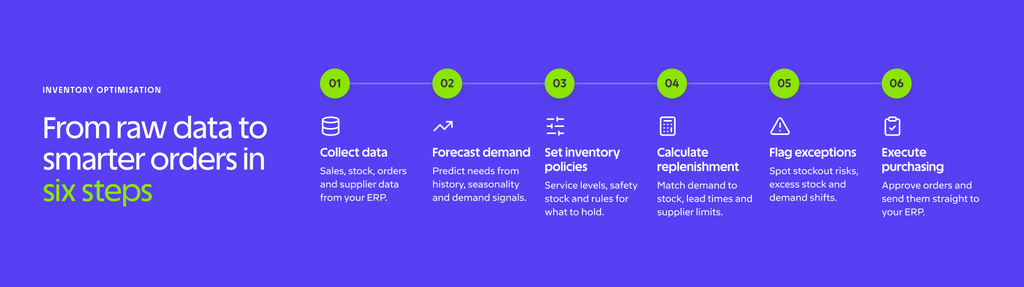
Most inventory optimisation tools follow a similar six-step process:
- Collect data: Bring together sales history, stock levels, product information, outstanding orders and supplier details from your ERP and other relevant systems.
- Forecast demand: Analyse historical patterns, seasonality and other demand signals to estimate future requirements.
- Set inventory policies: Establish service level targets, safety stock and other rules that determine how much inventory to hold.
- Calculate replenishment needs: Combine expected demand with stock availability, lead times and supplier constraints to determine purchasing requirements.
- Identify exceptions: Highlight items that need attention, such as potential stockouts, excess inventory or unusual changes in demand.
- Execute purchasing decisions: Allow planners to review recommendations and move approved orders into the purchasing workflow or ERP.
The value comes from connecting these activities. A forecast alone tells you what customers might buy, while inventory optimisation translates that forecast into decisions about how much stock to hold and what to order.
What should you look for in an inventory optimisation tool?
The most useful way to compare inventory optimisation tools is to examine how they support the decisions your team makes every day. Two systems might offer similar forecasting capabilities but differ significantly in how they calculate replenishment requirements, handle supplier constraints or integrate with your ERP.
The following table provides a practical framework for evaluating different solutions.
| Capability | Why it matters | What to ask in a demo |
|---|---|---|
| Demand forecasting | Helps anticipate demand across products, seasons and locations. | How does the system forecast seasonal, intermittent and new-item demand? |
| Safety stock optimisation | Balances availability with the cost of holding inventory. | Can safety stock reflect demand variability, lead times and service level targets? |
| Automated replenishment | Reduces manual ordering and supports consistent purchasing decisions. | How are order quantities calculated, reviewed and approved? |
| Supplier constraints | Ensures recommendations reflect purchasing realities. | Can the system handle minimum order quantities, pack sizes, order cycles and variable lead times? |
| ERP integration | Connects planning decisions with operational data and purchasing workflows. | Is there an existing connector for our ERP, and what information moves between the systems? |
| Multi-location planning | Supports inventory decisions across warehouses, stores and other locations. | Can we forecast, plan and replenish stock separately for each location? |
| Reporting and visibility | Helps teams identify problems and monitor performance. | Can planners see stockout risks, excess inventory and the reasons behind recommendations? |
| AI and advanced analytics | Helps identify patterns and interpret complex inventory data. | What does AI actually do, and can users understand and control its recommendations? |
| Implementation and support | Influences how quickly the software becomes useful. | What data preparation, training and ongoing support are included? |
Look beyond the feature checklist
Two solutions can offer similar capabilities but deliver very different planning experiences. Consider how the software handles a supplier whose lead time suddenly increases from four weeks to eight. Does the system recalculate requirements, show which products are affected and identify potential shortages early enough for planners to take action?
Testing practical scenarios like this reveals considerably more than a feature list. It shows how the software responds when conditions change and whether your team can act on the information it provides.
Make transparency part of your evaluation
AI is becoming more common in inventory optimisation software, but planners still need to understand why recommendations are made and what happens when they change them. This is particularly important when those recommendations influence purchasing commitments and working capital.
Ask vendors to demonstrate how their software explains forecasts, identifies potential problems and records manual adjustments. At AGR, this approach is reflected in features such as AI Sales History, which shows the source items used to build representative sales histories, and Item Analyzer, which provides item-level analysis of inventory health, demand, replenishment and supply risks.
You can explore these capabilities on AGR’s AI inventory management page.
Inventory optimisation tools to consider
Several software providers specialise in inventory optimisation, forecasting and replenishment. The following shortlist is not a ranking. It introduces five relevant solutions and highlights what to investigate when comparing them.
| Tool | Relevant use case | Capabilities to verify | Detailed comparison |
|---|---|---|---|
| AGR Inventory | Wholesalers, distributors and retailers looking to improve forecasting, inventory policies and replenishment alongside their ERP. | SKU-level forecasting, automated ordering, inventory visibility, supplier management and AI-assisted planning. | Explore AGR |
| Netstock | Businesses seeking dedicated demand planning, inventory optimisation and ordering software. | Forecasting methods, inventory policies, purchasing workflows, ERP integration and reporting. | AGR vs Netstock |
| Slimstock | Businesses evaluating demand and inventory planning across their supply chain. | Planning workflows, forecasting, replenishment, inventory policies and multi-location support. | AGR vs Slimstock |
| EazyStock | Businesses looking to improve inventory forecasting, stock levels and replenishment. | Service level planning, safety stock, order recommendations, supplier constraints and integration. | AGR vs EazyStock |
| RELEX Solutions | Retailers evaluating broader enterprise planning requirements across stores, distribution and merchandising. | Retail forecasting, store replenishment, allocation, planning scope and implementation requirements. | AGR vs RELEX |
The most important differences often emerge when you examine how each solution handles your particular requirements. A retailer operating hundreds of stores may prioritise location-level forecasting and allocation, while a wholesaler managing thousands of products from international suppliers may place greater importance on supplier constraints and purchasing automation.
Implementation also deserves attention. Ask vendors how their software connects to your existing systems, what information needs preparing and how much involvement your team will need during onboarding. The detailed comparisons above provide a starting point for evaluating AGR against each alternative.
Which tool fits your inventory planning needs?
Your business size matters, but inventory complexity is often a better indicator of what you need. The following scenarios highlight which requirements to prioritise during a software demonstration.
A small planning team moving away from spreadsheets
Small planning teams can struggle to keep up as their product ranges and purchasing workloads grow. Prioritise software that automates routine calculations, highlights exceptions and makes recommendations easy to review. During a demonstration, ask how one planner would manage several thousand SKUs and how much manual work the system could eliminate.
A wholesaler managing thousands of SKUs
Wholesalers often manage products with widely varying demand patterns, supplier conditions and lead times. Look for flexible inventory policies and replenishment calculations that reflect purchasing constraints. Ask vendors to demonstrate how their software handles a supplier delay, changing demand and minimum order quantities together.
A business operating several warehouses or stores
Businesses with multiple locations need to balance local demand with overall inventory availability. Prioritise location-level forecasting, stock visibility and replenishment or allocation capabilities. Ask vendors to show how requirements are calculated for individual locations and how those decisions affect central purchasing. Retailers can also explore AGR’s retail inventory management software.
An enterprise retailer with broader planning requirements
Large retailers may need to coordinate inventory decisions with assortment planning, promotions, merchandising and distribution. These requirements can extend beyond traditional inventory optimisation. Prioritise solutions that support the full scope of your planning processes, and ask vendors to demonstrate how commercial and operational planning workflows connect.
Questions to ask before you buy
A software demonstration should show how a system works with your inventory, suppliers and planning team. Bring real examples from your business and use the following checklist to compare vendors consistently.
- Which ERP connector will we use? Is it a standard integration or will it require additional development?
- Which modules are included in the proposed price? Are forecasting, automated ordering and reporting included?
- What data must we prepare? What historical sales, stock, product and supplier information is required?
- Can we test our own products and locations? Will the vendor demonstrate how the system handles our actual planning requirements?
- How are supplier constraints managed? Can the software account for minimum order quantities, pack sizes, order cycles and variable lead times?
- How does the tool explain its recommendations? Can planners understand the reasons behind forecasts and suggested orders?
- What happens when a planner overrides a recommendation? Can changes be tracked and reviewed?
- How is success measured after implementation? Which KPIs will be used to evaluate improvements in availability, inventory levels and planning efficiency?
You should also ask about ongoing support, training and the frequency of software updates. A useful demonstration follows a complete planning workflow rather than showing individual features in isolation. Ideally, you should see how the system identifies a problem, recommends an action and supports the planner in making a decision.
If you are considering AGR, book a demo to explore how the software could support your planning requirements.
Book a demo
See an inventory optimisation tool in practice
The benefits of inventory optimisation become clearer when you look at how businesses use the software in their daily operations.
Vital Pet Group, a UK pet products wholesaler, manages approximately 10,000 SKUs with a lean planning team. The company needed to improve product availability while making its purchasing processes more efficient. Managing a large product range manually made it difficult to maintain consistent stock levels and respond effectively to demand.
By introducing AGR’s inventory optimisation and automated ordering capabilities, Vital Pet Group moved towards a more structured, data-driven approach to replenishment. Purchasing processes became more automated, and the planning team gained better visibility into inventory requirements across its extensive product range.
Most notably, Vital Pet Group increased product availability from approximately 75% to 95% with AGR. The improvement demonstrates how inventory optimisation can help businesses meet customer demand more consistently while reducing the manual effort required to manage thousands of products.
Read the full Vital Pet Group case study.
Choosing an inventory optimisation tool that works for your business
The best inventory optimisation tool is the one that fits your operations, supports your planning team and helps you achieve measurable improvements in inventory performance. Comparing solutions using real business scenarios will give you a clearer picture of what each can deliver.
AGR combines demand forecasting, inventory optimisation, automated replenishment and inventory analysis in a cloud-based platform that works alongside existing ERP systems. It gives inventory teams the visibility, automation and control they need to make better purchasing decisions.
See how AGR could support your inventory planning requirements.